Theory V: xDSM and problem types
In this notebook we’ll take a look at a standard way to visualize graphs and look at different ways a cycle can emerge.
Let’s first re-use the 6 models from before.
Let’s draw that again using the graph representation (we’ll use a graphviz version since the matplotlib gets too cluttered:)
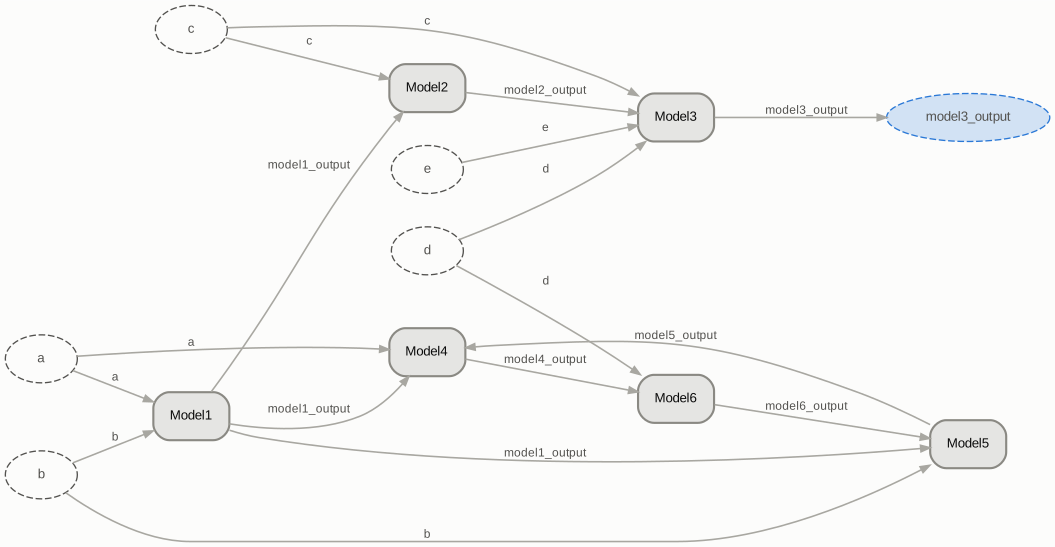
It’s already quite cluttered, and this is only with a few models. Moreover, it’s not so clear which ones are cycles and which ones are not.
A different method to visualize such graphs is using an adjacency matrix.
The convention is that the models are on the diagonal, and off-diagonal elements indicate edges.
An off-diagonal edge above the diagonal means an edge pointing from the higher model (more top-left) to the lower model (more down-right) and an edge below the diagonal points from the lower model to the higher model.
from cottax.consumers.visualization import render_html
from functools import partial
xdsm = partial(render_html, formatter = PlainFormat(), xdsm = {"input_label": "Input", "output_label": "Output"})
xdsm(to_graph(Model1, Model2, Model3, Model4, Model5, Model6))
In other words model1_outputs sits above the diagonal, so it points from Model1 (is an output of) and towards Model2 (is an input of).
The nice thing about this diagram is that if we see that a matrix is fully upper triangular, it means that the ordering is valid! Each lower model only depends on higher models; running the models from high to low is a valid ordering for the model collection.
With cycles and the strongly connected components algorithm, we see the cycles immediately; they are the parts of the graph where there is a lower triangular edge (like above). Ordering the models by those blocks – each cycle one block, and everything else a block of its own – visualizes a model collection clearly:
def Model7(model1_output, model4_output, model8_output):
    return model1_output**model4_output + model8_output


def Model8(model3_output, a, model1_output, model9_output):
    return a + model3_output / model1_output + model9_output

def Model9(model7_output, b):
    return b- model7_output

model1_to_9 = [Model1, Model2, Model3, Model6, Model9, Model4, Model5, Model7, Model8]
xdsm(to_graph(*model1_to_9), blocks=True)
We’ve now got two cycles, which the SCC algorithm blocks and is clearly visible. These are minimal and can’t be further reduced [1]
The nice thing is it allows us to make a decision: what solver seems appropriate here for each cycle? And should we take the two cycles together? Inspecting the graph gives a scalable way to look at such cycles immediately [2].
Problem Types
A cycle between models is not the only cycle that can be present.
An example is an implicit model:
Solve \(x^3 + x^2 +\sqrt{x - y} = 0.0\)
Why is this a cycle? Well, if you define a particular solver, it’s not: it’s just an explicit model obtaining x from y or vice-versa, but with a solve step inbetween. However, we’ve been arguing for flexibility the past couple notebooks: a priori we don’t know what the best solver is, and we want to remain flexible. Furthermore, we might actually want to solve this together with another model (if there’s strong coupling between an input/ output).
In some sense, a cycle is precisely something that needs solving or a problem type.
Let’s look at an implicit function, which is defined by its residual being 0.
def Model10(model3_output, model10_output):
    return model10_output**3 + model10_output**2 + (model10_output - model3_output)**0.5


xdsm(to_graph(*model1_to_9, flat.residual(Model10, "model10_output")), blocks=True)
A root-find problem type, signalling that this needs to be resolved, is now added to the Model10. Both names it minted are drawn as what they stand for rather than as their spelling: \(\textrm{cond}(\texttt{model10\_output})\) is the residual on model10_output, and \(\textrm{solve}(\texttt{Model10})\) is the problem over Model10.
Such problem types also exist for fixed point iterations (like a cycle) or for an internal optimizer.
These have an algebra: you can combine problem types as long as they make sense together: two root-finds are a bigger root-find, a root-find and an optimizer are a set of equality constraints added to the optimizer.
All three problem types are declared the same way. The places after the function name what the problem owns, and which wrapper takes the function is what says what makes its answer right:
wraps |
right when |
drawn as |
|
|---|---|---|---|
|
the residual |
the residual vanishes |
\(\textrm{cond}(u)\) |
|
the next value |
the next value equals the current one |
\(\textrm{cond}(u)\) |
|
nothing: an objective and constraints |
the objective is smallest, and the constraints hold |
— |
The first two declare a pair (a body that runs, and a problem that closes it), which is why they are always a cycle. An optimiser declares one node and no body: an objective and a constraint are ordinary variables some model already computes, so it mints no name of its own and there is nothing extra to notate.
def Model11(model11_output, model10_output):
    """A damped iteration: the condition *is* the next iterate, so nothing is subtracted."""
    return 0.5 * (model11_output + model10_output)


def Cost(model11_output, a, b):
    return (model11_output - 1.0)**2 + 0.1 * (a**2 + b**2)


@flat.inequality_constraint("margin_output")  # a constraint: its output held <= 0
def Margin(model3_output):
    return model3_output - 5.0


# An optimiser owns the design variables, and reads what the models compute.
# `a` and `b` are no longer external inputs: the optimiser is what produces them.
Design = cx.absolute.optimise(minimise=flat.place("cost_output"),           # the objective
                     design=(flat.place("a"), flat.place("b")),
                     subject_to=(Margin,))                         # g(x) <= 0
design_graph = to_graph(Model1, Model2, Model3, flat.residual(Model10, "model10_output"),
                        flat.fixed_point(Model11, "model11_output"), Cost, Margin, {"Design": Design})

xdsm(design_graph)
For a large graph the XDSM stops being readable; the N2 matrix keeps one row per model. A mark at (row, column) says the row produces what the column reads, so marks below the diagonal are feedback, and every block solved together is boxed in the colour of its problem type.
from cottax.consumers.visualization import render_html

render_html(design_graph, views=("n2",))
In this situation, the three problem types are all present, and they are all coupled. Now, the graph alone really doesn’t determine the nesting: which solver sits inside the other? Can they be combined? In this case, it’s important to look at the graph and make an informed decision. This cannot happen with only explicit functions: there’s only one, total cycle, not three nested ones. You can make it one cycle by putting everything in the optimizer naturally, but this is not always desired.
This’ll be in the form of operations in the graph: as we’ve already seen in the previous notebook, you can e.g. assume a particular variable during an iteration to make it acyclic, but there are multiple such operations and they can be combined.
Summary
The matrix representation provides a scalable way to inspect graphs and in combination with the strongly connected components algorithm easily locates and visualizes cycles, which demand a solver.
Beyond model-dependency cycles, a problem can also be declared outright. These always have to be assigned a solver, and can lead to a nested problem statement.
In the next notebook, we’ll look at ways to untangle this and assign solvers using graph operations.