Multigroup cross section generation and FW-CADIS
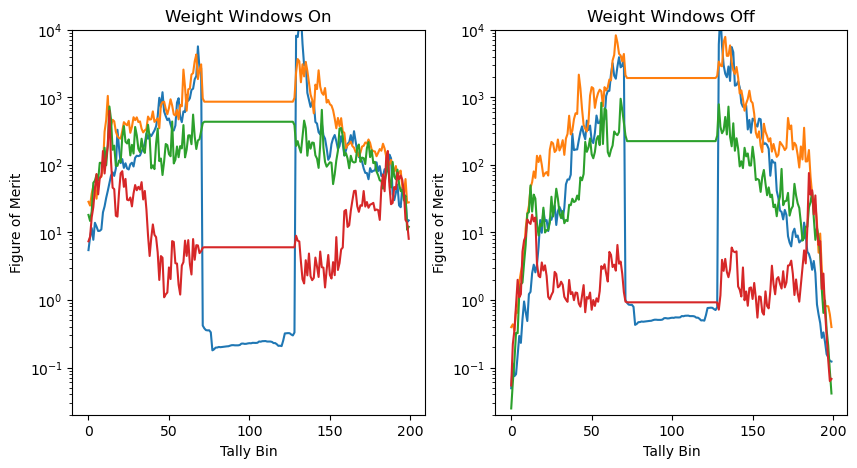
In this notebook, we create multi-group cross sections (mgxs) from an openmc simulation. Then, we use the deterministic code to generate FW-CADIS based weight windows, after which we compare the figure of merit on the same geometry, showing \(O(10^2)\) improvement!
import jax
import jax.numpy as jnp
import numpy as onp
import matplotlib.pyplot as plt
jax.config.update("jax_platforms", "cpu")
jax.config.update("jax_enable_x64", True)
import jax_sn
from jax_sn.operator_creation import DefaultMultiGroupStrategy
We will use the small mcbb library which handles the construction of a 1D blanket simulation and handles the I/O of OpenMC data.
OpenMCSettingsBlanketis a small wrapper around the OpenMC settings object with reasonable defaults for blanket simulations.OpenMCSymmetricLinearBlanketSimulationconstructs a symmetric linear blanket (i.e. | shield | breeding zone | plasma | breeding zone | shield) geometry and tags the appropriate materials from themcbb.examples.hcpb()material library.create_mgxs_librarycreates a multi-group cross section library from the OpenMC simulation results, which can then be converted to a dictionary of data arrays for use injax-sn. This is done using themgxs_lib_to_data_dictsfunction.The resulting
openmc_datadictionary contains simply a key for each material with two arrays: the total and scattering cross section (which includes the multiplication factor –nu-scatter).
Inspect the functions in the mcbb library to see how.
import mcbb
hcpb_blanket = mcbb.examples.hcpb()
n_samples_per_batch = 1e5
groups_list         = [14.1e6, 1e6, 300, 10, 0]
n_x_tally           = 200
settings            = mcbb.blanket_base.OpenMCSettingsBlanket(True, "openmc_data/", 10, n_samples_per_batch , seed = 29072026)
simulation_symm     = mcbb.linear_blanket.OpenMCSymmetricLinearBlanketSimulation(hcpb_blanket, settings, n_x_tally, groups_list)
mgxs_lib            = simulation_symm.create_mgxs_library(onp.flip(groups_list), 4)
openmc_data         = mcbb.openmc_base_functions.mgxs_lib_to_data_dicts(mgxs_lib)
/home/tbogaarts/miniconda3/envs/jaxsbgeom/lib/python3.12/site-packages/openmc/mixin.py:70: IDWarning: Another Filter instance already exists with id=1.
  warn(msg, IDWarning)
/home/tbogaarts/miniconda3/envs/jaxsbgeom/lib/python3.12/site-packages/openmc/mixin.py:70: IDWarning: Another Filter instance already exists with id=410.
  warn(msg, IDWarning)
/home/tbogaarts/miniconda3/envs/jaxsbgeom/lib/python3.12/site-packages/openmc/mixin.py:70: IDWarning: Another Filter instance already exists with id=13.
  warn(msg, IDWarning)
 WARNING: Negative value(s) found on probability table for nuclide Mo92 at 300K
 WARNING: Negative value(s) found on probability table for nuclide Mo94 at 300K
 WARNING: Negative value(s) found on probability table for nuclide Mo95 at 300K
 WARNING: Negative value(s) found on probability table for nuclide Mo96 at 300K
 WARNING: Negative value(s) found on probability table for nuclide Mo97 at 300K
 WARNING: Negative value(s) found on probability table for nuclide Mo98 at 300K
 WARNING: Negative value(s) found on probability table for nuclide Mo100 at 300K
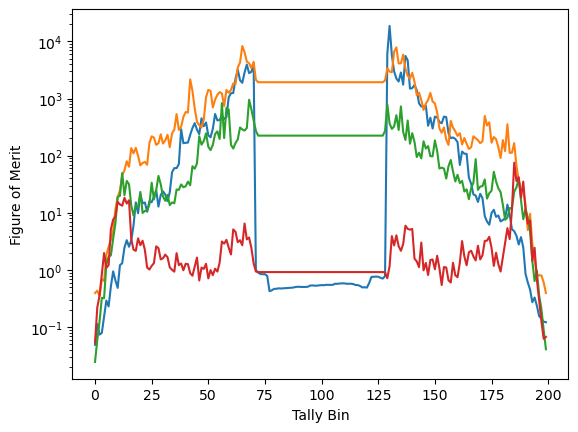
We can plot the figure of merit \(1/(RE^2 T)\) as a function of the tally bin:
tally_result = simulation_symm.get_tally_results(quantities=['mean', 'rel_err'])

plt.semilogy(1 / (tally_result['flux']['rel_err']**2 * tally_result['runtime']))
plt.xlabel("Tally Bin")
_ = plt.ylabel("Figure of Merit")
/home/tbogaarts/miniconda3/envs/jaxsbgeom/lib/python3.12/site-packages/openmc/tallies.py:1859: RuntimeWarning: invalid value encountered in divide
  data = self.std_dev[indices] / self.mean[indices]
We then directly setup a linear blanket simulation using 10 elements in all blanket layers.
The setup is very similar to the linear setup before, so we just use the already available functions of mcbb to generate the multi-group operator.
Then we run the FW-CADIS calculation to generate the importance map, which we interpolate (to have a smaller number of weight-window mesh elements) then convert to weight windows to show.
from mcbb.sn.base_sn import setup_linear_symm_mgop
from jax_sn.solvers.right_hand_side import IsotropicSourceSingleGroup
from mcbb.openmc_base_functions import _importance_map_to_weight_windows
import lineax as lx
from jax_sn.variance_reduction import fw_cadis_scalar_flux
degree = 3
tn_order = 3


mgop, source_basis, solution_domain = setup_linear_symm_mgop(hcpb_blanket, openmc_data[0], [10 for i in range(8)], degree, tn_order, multi_group_strategy = DefaultMultiGroupStrategy.default_multi_group_strategy())

rhs = IsotropicSourceSingleGroup.from_operator(mgop, source_basis)

solver = lx.BiCGStab(1e-10, 1e-10, max_steps = 200)
importance_map_solution = fw_cadis_scalar_flux(mgop, rhs, solver)
from jax_sn.tools.plotly import plot_domain


plot_domain(mgop.data.domain, material_names = list(hcpb_blanket.layer_names[::-1]) + list(hcpb_blanket.layer_names[1:]), show_element_boundaries = False)
After obtaining the importance map, we will interpolate it to define it on the mesh we will use later (simple linear spacing):
plasma_thickness = hcpb_blanket.layers[0].thickness
s_sample         =  jnp.linspace(plasma_thickness, hcpb_blanket.average_thickness, 20)
blanket_start    = sum(hcpb_blanket.average_thicknesses[1:])  # just use the right side of the blanket.
importance_map   = solution_domain.interpolate(blanket_start +s_sample[:, None], importance_map_solution[:, 0 , ...])
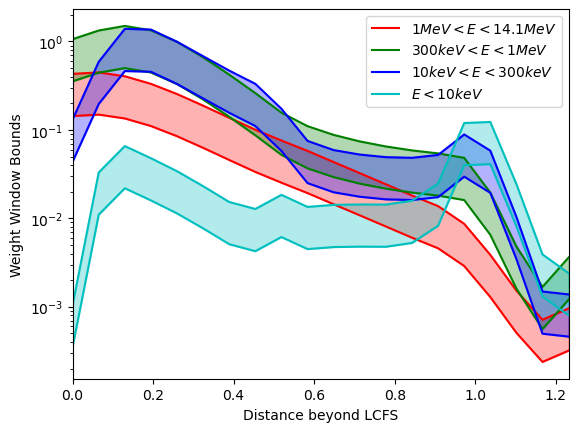
We will now show the weight windows of this importance map by plotting it:
# Just for plotting; we build the weight windows directly from this importance map below.
ww_up, ww_down = _importance_map_to_weight_windows(importance_map, ww_lower_upper_ratio = 3)
colors = ['r','g','b','c']
d = s_sample - plasma_thickness # distance beyond the LCFS (start of the solid blanket)
energy_groups = ['$1 MeV < E < 14.1 MeV$', '$300 keV < E < 1 MeV$', '$10 keV < E < 300 keV$', '$E < 10 keV$']
for i in range(ww_up.shape[0]):
    plt.plot(d, ww_up[i, :], color=colors[i], label=energy_groups[i])
    plt.plot(d, ww_down[i, :], color=colors[i], linestyle='-')
    plt.fill_between(d,  ww_up[i, :], ww_down[i, :], color=colors[i], alpha=0.3)
plt.yscale('log')
plt.legend()
plt.xlim(0.00, hcpb_blanket.average_thickness - plasma_thickness)
plt.xlabel("Distance beyond LCFS")
plt.ylabel("Weight Window Bounds")
Text(0, 0.5, 'Weight Window Bounds')
Now we create weight windows from it. We mirror it to the other side of the symmetric blanket, put into a rectilinear mesh and create a weight window object for OpenMC.
We use the convenience function importance_map_to_weight_window to handle the creation of the OpenMC weight window object.
from mcbb.openmc_base_functions import importance_map_to_weight_window
import openmc

blanket_start = sum(layer.thickness for layer in hcpb_blanket.layers[1:])  # everything except the plasma

front_importance = importance_map[:, ::-1]   # ascending in x, from x=0 up to x=blanket_start
back_importance  = importance_map              # ascending in x, from x=blanket_start+plasma_thickness to the back edge

front_cells = 0.5 * (front_importance[:, :-1] + front_importance[:, 1:])
back_cells  = 0.5 * (back_importance[:, :-1] + back_importance[:, 1:])
plasma_cell = jnp.full((importance_map.shape[0], 1), jnp.nan)  # no weight window inside the plasma itself

importance_map_elem = jnp.concatenate([front_cells, plasma_cell, back_cells], axis=1)

positions_front = blanket_start - d[::-1]                    # ascending, [0, blanket_start]
positions_back  = blanket_start + plasma_thickness + d       # ascending, [blanket_start + plasma_thickness, back edge]
mesh_edges      = onp.concatenate([positions_front, positions_back])  # meters, aligned with the geometry's own x=0 origin

mesh        = openmc.RectilinearMesh()
mesh.x_grid = mesh_edges * 1e2  # m -> cm
mesh.y_grid = [simulation_symm.geometry.bounding_box[0][1], simulation_symm.geometry.bounding_box[1][1]]
mesh.z_grid = [simulation_symm.geometry.bounding_box[0][2], simulation_symm.geometry.bounding_box[1][2]]

weight_windows = importance_map_to_weight_window(importance_map_elem, groups_list, mesh, ww_lower_upper_ratio=3, max_split=2000)
We generate the same simulation but with a weight window and run it. It will take slightly longer due to the weight windows splitting particles.
sim_2 = simulation_symm.with_weight_windows(weight_windows)

sim_2.run(statepoint_file = "statepoint.10_ww.h5")
Cached at statepoint file: statepoint.10_ww.h5
'statepoint.10_ww.h5'
We can now compare both figures of merit, showing \(O(10^2)\) increase with weight windows in the edge!
tally_result_ww = sim_2.get_tally_results(quantities=['mean', 'rel_err'])
fig, axs = plt.subplots(1,2, figsize = (10,5))

def _set_plot(ax, tally_result, title):
    ax.set_title(title)
    ax.semilogy(1 / (tally_result['flux']['rel_err']**2 * tally_result['runtime']))
    ax.set_ylim(2e-2, 1e4)
    ax.set_xlabel("Tally Bin")
    ax.set_ylabel("Figure of Merit")

_set_plot(axs[0], tally_result_ww, "Weight Windows On")
_set_plot(axs[1], tally_result, "Weight Windows Off")
/home/tbogaarts/miniconda3/envs/jaxsbgeom/lib/python3.12/site-packages/openmc/tallies.py:1859: RuntimeWarning:

invalid value encountered in divide